Generated with Monsha
ScratchJr Programming Block Adventures
Smart Worksheet · 1 · English
ScratchJr Programming Block Adventures
Coding with ScratchJr
Welcome to the world of coding! In this worksheet, you will practice using blocks to make your characters move, talk, and dance. Follow the instructions for each activity.
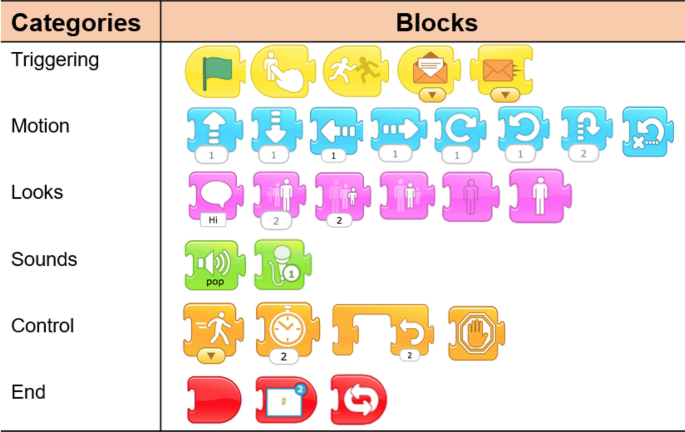
Activity 1: Color Match
Draw a line to match the block color to its job category.
- Yellow
- Blue
- Purple
- Green
- Orange
- Red
- Motion Blocks
- Sound Blocks
- Trigger Blocks (Start)
- Control Blocks
- End Blocks
- Looks Blocks
Activity 2: The Magic Start
Which block do you click to make your whole program run? Circle the correct answer.
A) The Red Stop Block
B) The Green Flag Block
C) The Blue Arrow Block
D) The Orange Wait Block
Activity 3: Label the Home Base
Look at the diagram of the ScratchJr screen. Use the word bank to label the parts.
Word Bank: Script Area | Character List | Stage | Background Button | Block Palette
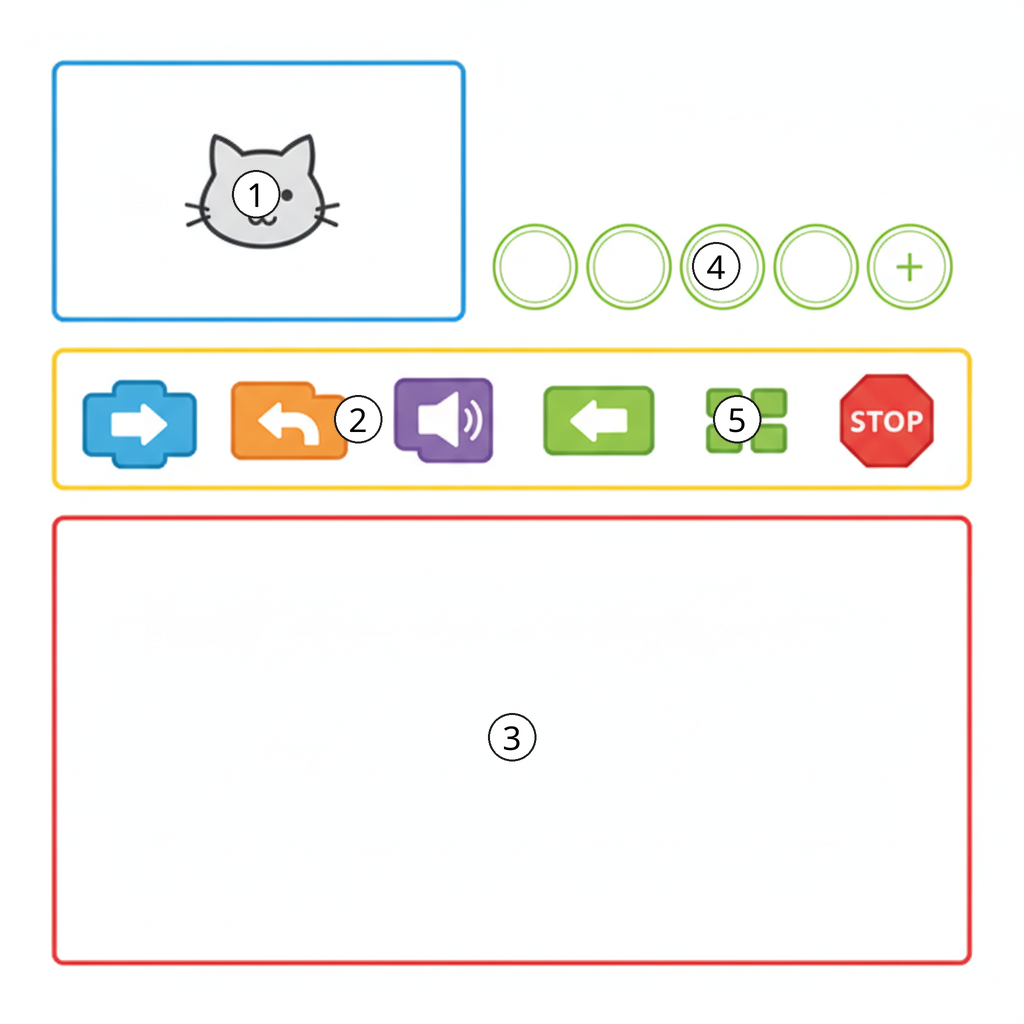
- ____________________ (Where characters move)
- ____________________ (Where you pick blocks)
- ____________________ (Where you snap blocks together)
- ____________________ (Where you see your actors)
- ____________________ (To change the scenery)
Activity 4: True or False?
Write T for True or F for False.
- Blocks must be snapped together to work. [ ___ ]
- You can only have one character in a project. [ ___ ]
- The Yellow flag block starts a program. [ ___ ]
Activity 5: Draw a Motion Block
In the box below, draw the Move Right block. Don't forget the arrow and the number!
Activity 6: Block Talk
Match the icon on the block to the action it performs.
- Speech Bubble
- Speaker Icon
- Person getting bigger
- Clock Icon
- Wait
- Say something
- Grow/Increase size
- Play a sound
Activity 7: Changing Looks
Which block makes a character get smaller? Circle your answer.
A)

(Shrink Block)
B)

(Grow Block)
C)

(Reset Size Block)
Activity 8: Put them in Order
You want your character to Start, Move, and then Stop. Number these blocks 1, 2, and 3 to show the correct order.
[ ___ ] Blue Move Block
[ ___ ] Yellow Green Flag Block
[ ___ ] Red End Block
Activity 9: Fill in the Blank
Use a word from the box to complete the sentence.
Yellow | Blue | Red
"The ___________ blocks are used to make your character move across the stage."
Activity 10: Steps and Numbers
Look at a motion block. What does the number at the bottom tell the character?
A) How fast to go
B) How many steps to take
C) What color the character is
D) How many friends to bring
Answer: ____________________
Activity 11: Patience, Please!
Which category contains the Wait block (the one with the clock)?
A) Motion (Blue)
B) Trigger (Yellow)
C) Control (Orange)
D) Sound (Green)
Activity 12: Cleaning Up
How do you delete a block you don't want anymore?
A) Tap it three times
B) Drag it back to the Block Palette
C) Shake your tablet
D) Blow on the screen
Activity 13: Direction Detective
Draw a line from the block name to the direction it moves.
- Move Up --------> [ ↑ ]
- Move Down ------> [ ← ]
- Move Left ------> [ ↓ ]
- Move Right -----> [ → ]
Activity 14: Draw a Sound
Draw the Pop Sound block (it has a speaker icon).
Activity 15: Back to Normal
Which block sends a character back to its original size?
A) Grow
B) Shrink
C) Reset Size
D) Hide
Activity 16: Puzzle Pieces
Complete the sentence below:
"Coding blocks in ScratchJr snap together just like pieces of a ____________________."
Activity 17: The Red Block
What does a Red Block do in your script?
A) It starts the program
B) It makes a sound
C) It tells the program to end
D) It turns the character red
Activity 18: Motion Block Labeling
Look at the motion blocks below. Use the word bank to write the correct name for each number.
Word Bank: Move Left | Move Up | Hop/Jump | Move Down | Move Right
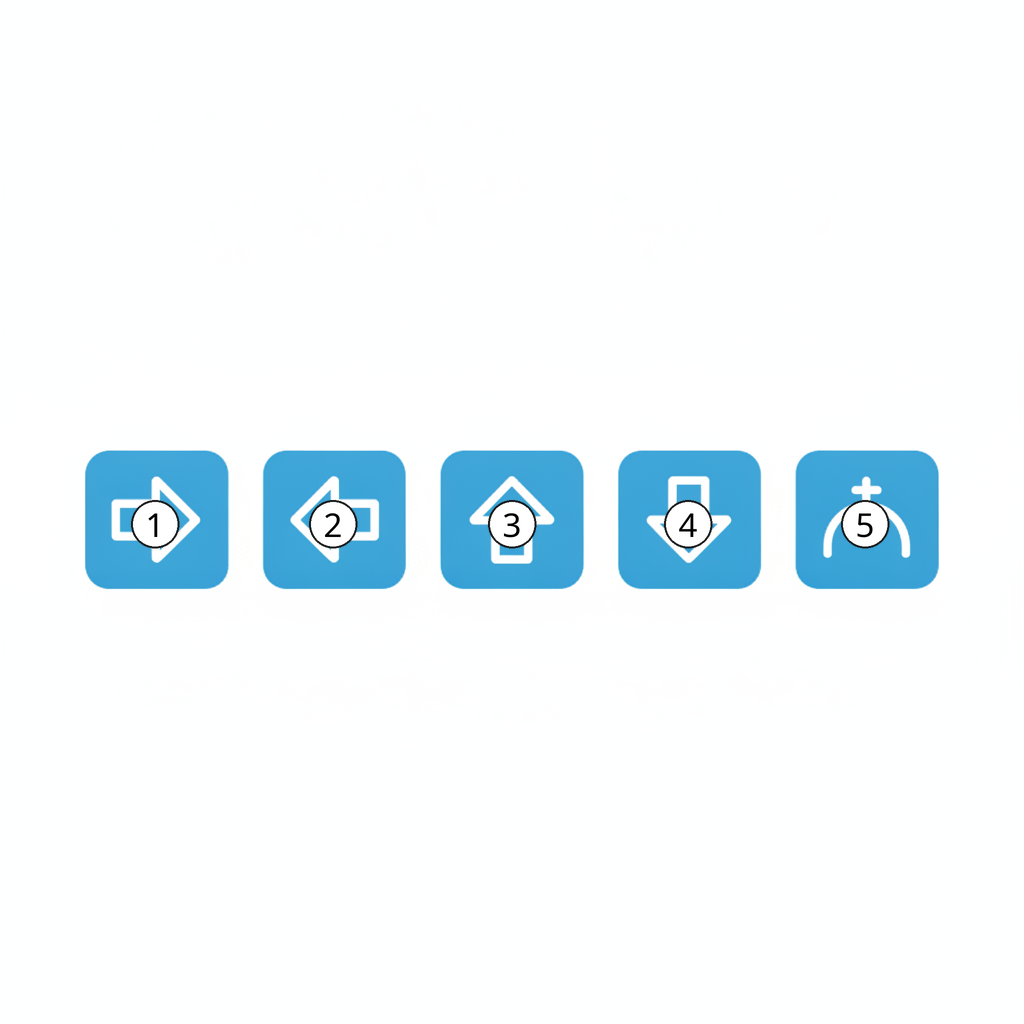
-
-
-
-
-
Activity 19: Sequence a Deletion
Number these steps 1 and 2 to show how to delete a character from your project.
[ ___ ] Tap and hold the character in the Character List.
[ ___ ] Tap the red 'X' that appears.
Activity 20: Design Your Own Script
Draw a sequence of 3 blocks that would make a cat Start with the Green Flag, Jump, and then Say "Hi!".