Generated with Monsha
How Computers Hear Our Fingers: The Magic of Mechanical Keyboards
Lesson Plan · Year 2 · English
How Computers Hear Our Fingers: The Magic of Mechanical Keyboards
Standards Addressed
This lesson aligns with the UK National Curriculum for Computing at Key Stage 1 (Year 2):
- Using Technology Purposefully: Pupils learn to use technology to create and manipulate digital content by understanding the physical tools (hardware) used for input.
- Recognising Common Uses of IT: Pupils explore different types of hardware used by professionals, such as mechanical keyboards used by writers and programmers, to understand how technology varies beyond the classroom.
- Logical Reasoning: Pupils use logical reasoning to predict what happens when a physical switch is pressed and how it sends a signal to the screen (Source: UK Department for Education ).
21st Century Skills / College & Career Readiness Skills
- Critical Thinking: Students compare and contrast different technologies (mechanical vs. membrane keyboards) to understand why someone might choose one tool over another for a specific job.
- Technological Literacy: Building a foundational understanding of computer hardware components and the "hidden" mechanics behind everyday devices.
- Communication: Developing specific technical vocabulary (e.g., actuation, tactile, switch) to explain how a mechanical system works.
- Observation & Analysis: Encouraging students to use their senses (hearing and touch) to evaluate the effectiveness of an interface.
Assessment and Evaluation Plan
Assessment Type | Activity Description |
|---|---|
Formative (During Lesson) | The Sound Challenge: Students close their eyes and listen to two different keyboards being typed on. They must identify which one is "mechanical" based on the auditory feedback (the click). |
Practical Assessment | The Feel Test: Students try typing a short sentence on both a standard school keyboard and a mechanical keyboard. They record one word to describe each (e.g., "mushy" vs. "springy"). |
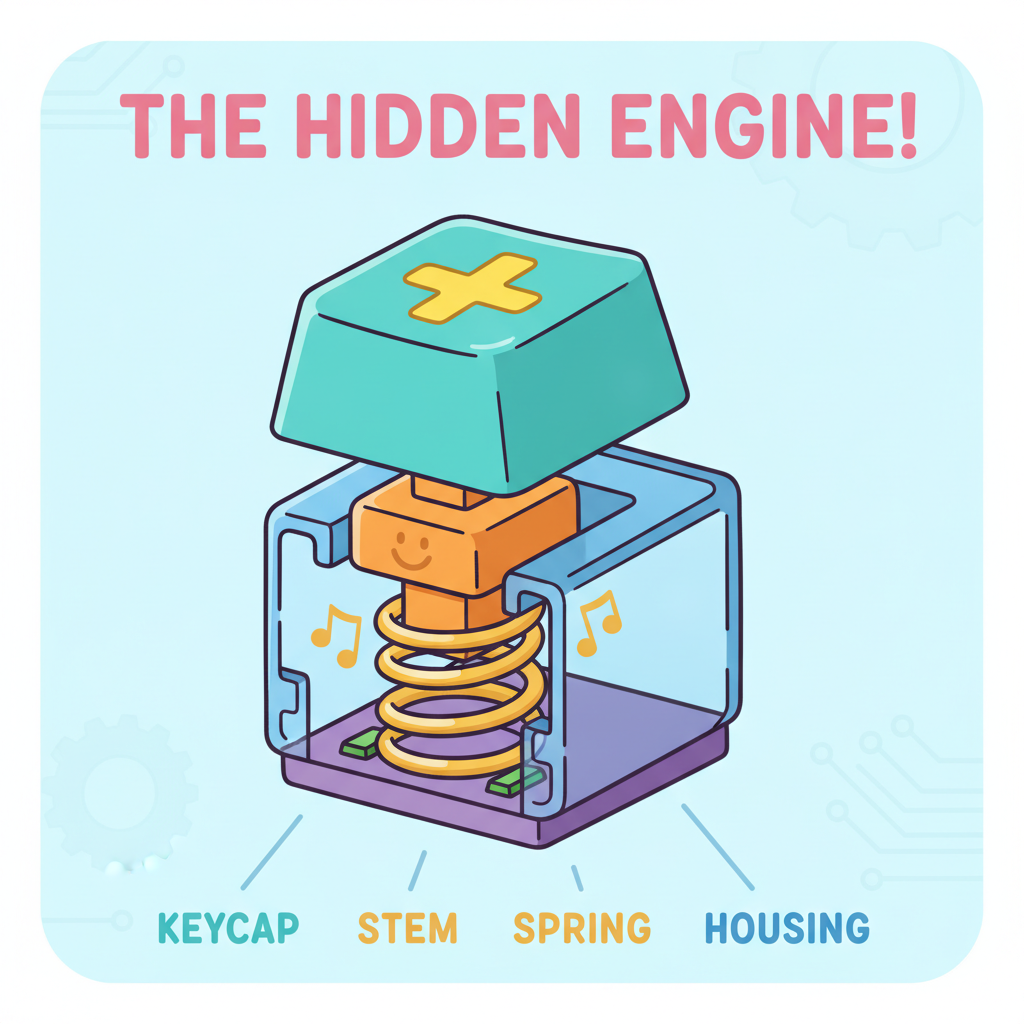
Summative (End of Lesson) | The 'Hidden Engine' Drawing: Students draw a simple diagram of a keyboard key and label the three main parts: the Keycap (the face), the Spring (the bouncy part), and the Switch (the engine). |
Evaluation Metric | Exit Ticket: Students answer: "Why does a mechanical keyboard make a clicking sound?" (Expected answer: Because a physical switch is closing to send a signal). |
Key Concepts
1. The Switch: The "Hidden Engine"
Every key on a mechanical keyboard has its own individual "engine" called a switch. Unlike standard school keyboards that use a big rubber sheet (membrane), mechanical keyboards use a physical spring and metal parts for every single letter (Source: Business Insider ).
2. Tactile Feedback (The "Feel")
Mechanical keyboards are famous for their tactile feel. This means you can feel a little "bump" or hear a "click" the exact moment the computer knows you have pressed the key. This is called the actuation point (Source: Redragon Beginner's Guide ).
3. Actuation: Sending the Signal
When you press the key, the stem (the cross-shaped middle part) pushes down a spring. When it reaches the bottom, two metal pieces touch. This completes an electrical circuit, telling the computer, "Hey, the letter A was just pressed!"
4. Comparison: Mechanical vs. Membrane
- Membrane Keyboards: Found on most laptops. They feel "mushy" because they use rubber domes. You usually have to press them all the way down to the bottom for them to work.
- Mechanical Keyboards: Preferred by gamers and writers because they are faster, more precise, and can last for millions of clicks without wearing out (Source: Glorious Gaming Basics ).