Generated with Monsha
How Mechanical Keyboards Work
Lesson Plan · Year 2 · English
How Mechanical Keyboards Work
Standards Addressed
- Computing National Curriculum (UK) - Key Stage 1:
- Recognise common uses of information technology beyond school.
- Use technology purposefully to create, organise, store, manipulate and retrieve digital content (by understanding the input devices used).
- Understand how digital devices work in simple terms (input, process, output).
Objectives & Learning Outcomes
By the end of this lesson, students will be able to:
- Identify a mechanical keyboard as an input device.
- Explain the basic difference between a mechanical keyboard and a standard membrane keyboard (the 'click' and the 'feel').
- Describe the simple parts inside a keyboard switch (stem, spring, and housing).
- Discuss why different people might choose different types of switches for typing or gaming.
21st Century Skills/College & Career Readiness Skills
- Critical Thinking: Comparing two different technologies (mechanical vs. membrane) to see which might be better for specific tasks.
- Communication: Using technical vocabulary (input, switch, tactile, audible) to describe how a device works.
- Technological Literacy: Understanding the internal mechanics of everyday digital tools, moving beyond just 'using' them to 'understanding' them.
Instructional Sequence
Total Duration: 75 Minutes
1. Introduction: What's Under the Key? (10 mins)
- Start with a simple question: "When you press a key on a computer, how does it know you've pressed it?"
- Show a standard 'mushy' membrane keyboard and a mechanical keyboard (or play a sound clip of both).
- Introduce the concept of an input device—a tool we use to give instructions to a computer.
2. The Secret of the Switch (15 mins)
- Explain that mechanical keyboards have a separate physical 'switch' for every single key.
- Visual Aid: Use the diagram below to show the parts of a switch.
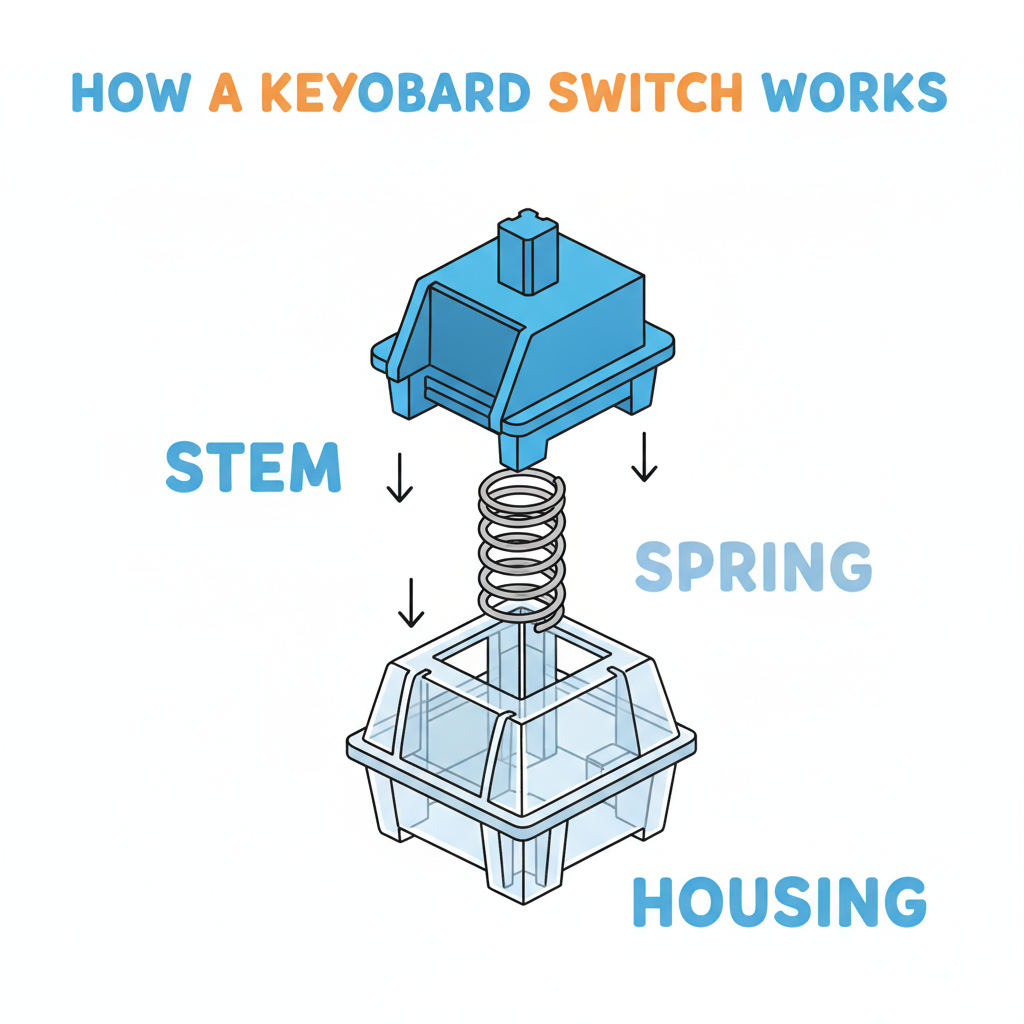
- Key Vocabulary:
- Stem: The part that moves down when you press.
- Spring: The part that pushes the key back up.
- Housing: The 'house' that holds everything together.
3. The Three C's: Click, Clack, and Comfort (15 mins)
- Discuss why people like mechanical keyboards. Use sources like HHKB and Das Keyboard to explain that these keyboards can last longer and feel better to type on (Das Keyboard, 2024).
- Explain the different types of switches using a simple analogy (e.g., the 'Pokemon' analogy mentioned in the YouTube resource):
- Blue Switches: Loud and 'clicky'.
- Red Switches: Smooth and quiet.
- Brown Switches: A little bit of both.
4. Group Activity: The Switch Designers (25 mins)
- Task: Students work in pairs to 'design' their own keyboard switch.
- They must draw a switch and decide: Is it loud or quiet? Is it easy to press or hard to press (stiff spring vs. soft spring)?
- Students present their 'design' to the person next to them, explaining their choice.
5. Wrap-up: Input Experts (10 mins)
- Quick-fire quiz on the parts of the switch.
- Final thought: Technology isn't just magic; it's made of small, clever parts working together!
Assessment and Evaluation Plan
Formative Assessment (During Lesson)
- Observation: Monitor student discussions during the 'Switch Designers' activity to ensure they use the correct vocabulary (stem, spring, tactile).
- Check for Understanding: Use 'thumbs up/thumbs down' to check if students understand that a keyboard is an input device.
Summative Assessment (End of Lesson)
- Exit Ticket: Students must answer one multiple-choice question before leaving.
- Which part of the keyboard switch pushes the key back up after you press it? A. The Battery B. The Housing C. The Spring D. The Stem
- What do we call a device, like a keyboard, that gives instructions to a computer? A. Input Device B. Output Device C. Screen D. Storage Device